Secure Mode
Understand XLQP Secure Mode, protected asset handling, Anti Logger blocking and whitelists, the client-side spoofers, compatibility requirements, and the limits of each.
Secure Mode
Secure Mode is an early-load privacy and asset policy for XLQP Gen1. It changes how the library handles output and media assets before the UI is created.
Interface previews
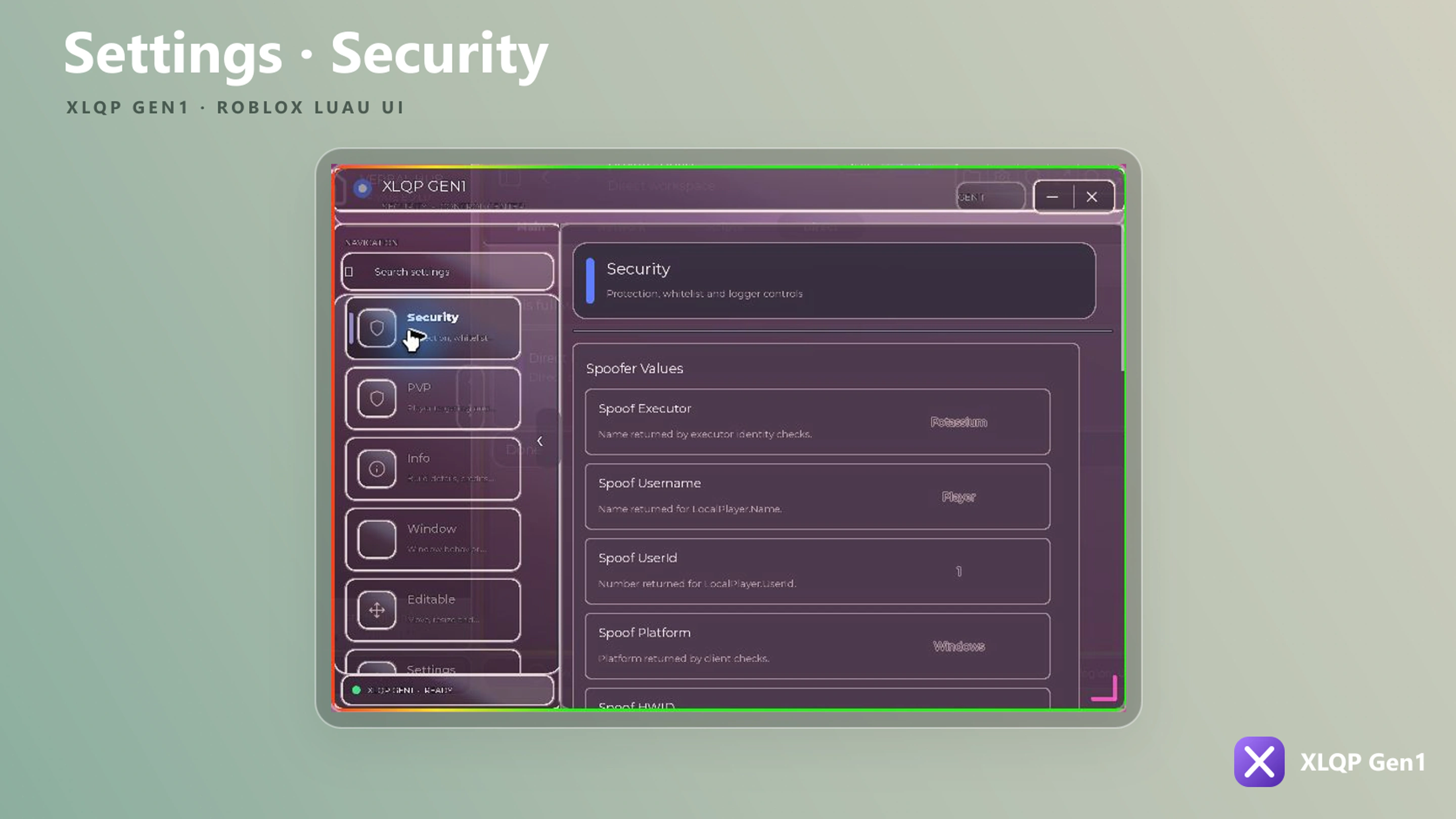
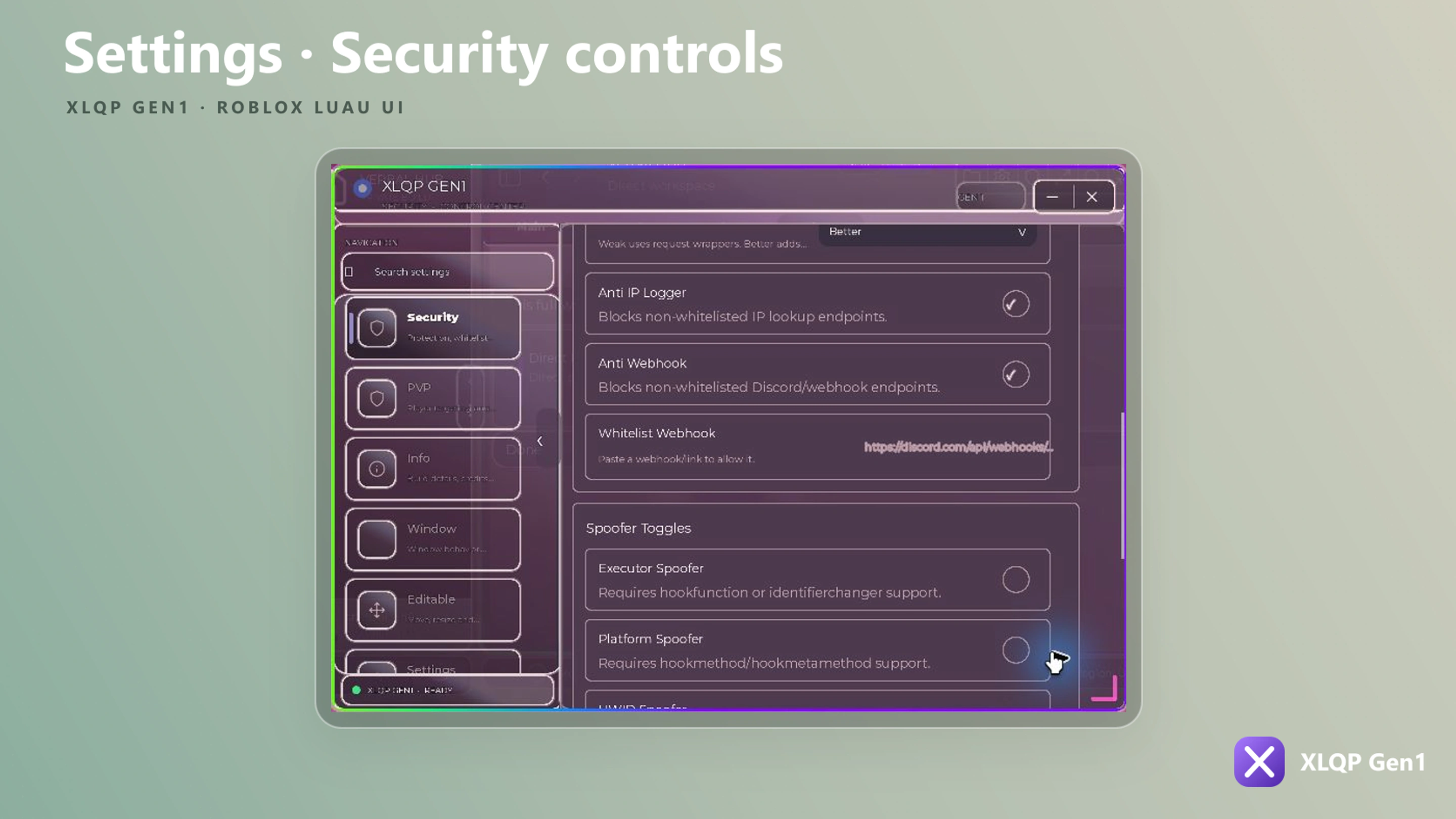
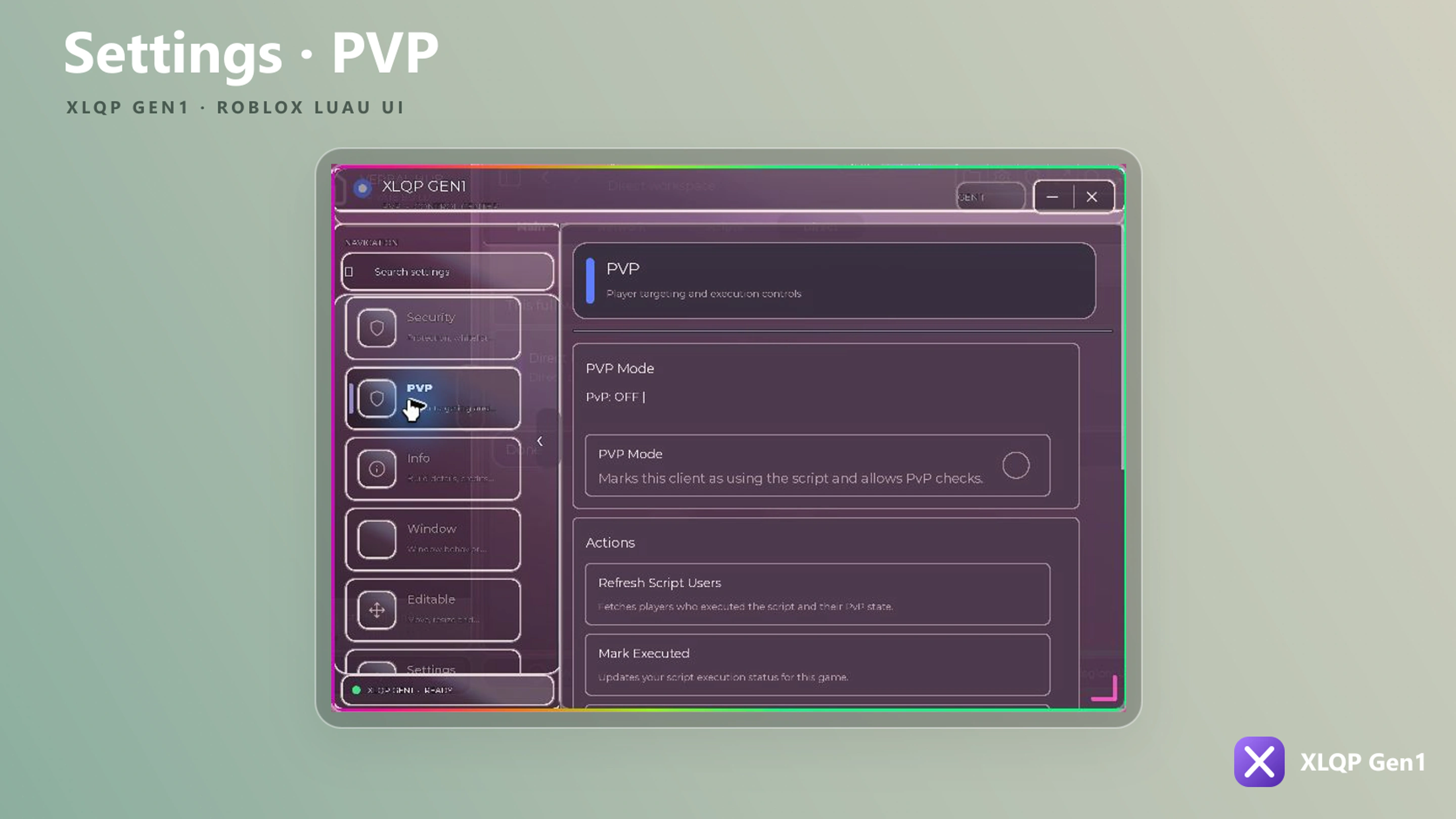
Enable it before loading XLQP
XLQP reads XLQP_SECURE once while the source is loading. Set it before the official loader.
Enable and verify it
getgenv().XLQP_SECURE = true
getgenv().XLQP_ASSET_ID = nil
getgenv().XLQP_ASSET_IDS = nil

local Library = loadstring(game:HttpGet("https://raw.githubusercontent.com/josediaz765/XLQP-UIS/main/xlqp%20gen1"))()
Loader header globals
Every global in this table is read from getgenv() while the source loads, so all of them must be set before the loader runs. Setting one afterward has no effect.
| Global | Read by the current source | Purpose |
|---|---|---|
XLQP_SECURE | Yes | Starts Secure Mode when it is exactly the boolean true |
XLQP_ASSET_ID | No | Reserved for a single custom asset override |
XLQP_ASSET_IDS | No | Reserved for a table of custom asset overrides |
The asset globals are reserved, not active
XLQP_ASSET_ID and XLQP_ASSET_IDS appear in the standard loader header as explicit nil placeholders so the intent is visible, but the current source never reads them. Assigning an ID to either one will not make that image load under Secure Mode.
To use a custom image under Secure Mode today, it has to be registered as a built-in asset. XLQP registers its own icon set this way at startup, and it registers an asset ID automatically when one is supplied as a custom background. Any ID that was never registered stays blank, which is the fail-closed behavior described below.
Two further globals control re-execution rather than security, and are documented separately: XLQP_REEXECUTE_SOURCE and XLQP_AUTO_REEXECUTE_SOURCE.
What Secure Mode changes
| Area | Secure Mode behavior | Why it matters |
|---|---|---|
| XLQP diagnostic output | Replaces XLQP’s internal print and warn output with no-op functions | Reduces library messages and asset failures exposed in the client output |
| Image properties | Routes Image, HoverImage, PressedImage, MidImage, TopImage, BottomImage, and Texture assignments through the secure asset resolver | Prevents arbitrary asset identifiers from being assigned directly |
| Built-in icons | Allows the IDs registered by XLQP’s built-in icon tables | Keeps normal library icons working under the stricter asset policy |
| Roblox thumbnails | Allows AvatarHeadShot, Avatar, and GameIcon rbxthumb:// values where the calling component permits them | Supports profile and game artwork without accepting every thumbnail string everywhere |
| Remote resolution | Downloads allowed image data, validates the file signature, stores it locally, then loads it through getcustomasset or getsynasset | The GUI receives a local custom-asset value instead of the original remote asset reference |
| Media and mesh properties | Clears SoundId, Video, MeshId, TextureID, and TextureId when the assigned string is an asset ID, an rbxthumb:// value, or an http(s):// URL | Applies a stricter default to media types that are not handled by the secure image cache |
| Existing and future GUI descendants | Watches the XLQP root GUI and every added descendant, reapplying the policy when a protected property changes later | Keeps the policy active when XLQP creates more UI after startup |
The descendant watcher covers the property sets it can act on:
| Instance type | Watched properties |
|---|---|
ImageLabel, ImageButton | Image, HoverImage, PressedImage |
ScrollingFrame | MidImage, TopImage, BottomImage |
VideoFrame | Video |
Sound | SoundId |
Values that already start with rbxasset://, content://, or synasset:// are skipped by the watcher, since they are treated as local or internal.
Asset decision flow
XLQP receives an asset value
├── Internal rbxasset://, content://, or synasset:// value
│   └── Keep it
├── Registered XLQP built-in image ID
│   └── Download → validate image bytes → cache → load as a custom asset
├── Supported avatar/game thumbnail in an allowed component
│   └── Request thumbnail → validate → cache → load as a custom asset
└── Unapproved remote or numeric asset value
    └── Leave the protected property blank
The image validator accepts PNG, JPEG, GIF, and WebP signatures. Files are cached under:
XLQPGen1/secure-assets-v3XLQP recognizes an asset ID from any of these forms before deciding whether it is an approved built-in:
rbxassetid://1234567890
https://www.roblox.com/asset/?id=1234567890
https://www.roblox.com/library/1234567890
https://create.roblox.com/store/asset/1234567890
https://assetdelivery.roblox.com/v1/asset/?id=1234567890
1234567890
Recognizing the ID is not the same as allowing it. An ID that XLQP did not register as a built-in is still left blank.
Runtime requirements
Secure image resolution needs the following functions from the client environment:
makefolderisfolderwritefileisfilegetcustomassetorgetsynasset- an available HTTP path such as
game:HttpGet,request,http_request, orsyn.request
If the filesystem or custom-asset functions are unavailable, a protected image that needs conversion remains blank. This is an intentional fail-closed behavior.
The first image load may be delayed
Uncached images resolve asynchronously. XLQP initially assigns an empty value, downloads and validates the image, and then updates the live GUI object if it still exists. Later uses can load from the local cache.
Supported values
| Value | Expected result |
|---|---|
XLQP built-in icon name such as "home" | Resolves through the registered icon set |
Registered built-in rbxassetid://... image | Converted to a validated local custom asset |
Supported rbxthumb://type=AvatarHeadShot... value | Converted when the component explicitly allows avatar thumbnails |
rbxasset://..., content://..., or synasset://... | Passed through as an already-local/internal value |
| Arbitrary numeric image ID | Blocked unless XLQP registered it as a built-in asset |
| Arbitrary HTTP image URL | Not accepted by the general secure image resolver |
| Remote or numeric sound, video, mesh, or texture ID | Cleared when handled by the protected property path |
Secure Mode is not the anti-detection layer
Secure Mode, Anti Logger, and the spoofers are three separate systems. They can all be active at once, but each protects a different surface.
| System | Enabled with | Scope |
|---|---|---|
| Secure Mode | getgenv().XLQP_SECURE = true before loading | XLQP output and GUI asset assignment |
| Anti Logger | On by default; configured with Security in MakeWindow | Known webhook and public-IP logger URL patterns used through supported request paths |
| Spoofers | Runtime only, through Library:SecuritySet(...) or the built-in Security tab | Values that identifying calls report back, when the executor exposes hook functions |
getgenv().XLQP_SECURE = true
local Library = loadstring(game:HttpGet("https://raw.githubusercontent.com/josediaz765/XLQP-UIS/main/xlqp%20gen1"))()

local Window = Library:MakeWindow({
    Branding = {
        Name = "My Hub",
    },
    Security = {
        AntiLogger = true,
        Mode = "Better",
        DiscordWebhookWhitelist = {
            "https://discord.com/api/webhooks/APPROVED_ID/APPROVED_TOKEN",
        },
    },
})
Anti Logger
Anti Logger is enabled by default
XLQP treats any value other than the boolean false as enabled. Security.AntiLogger = true documents the intent but does not change the default; only Security.AntiLogger = false turns the protection off.
Configuration
| Field | Default | Meaning |
|---|---|---|
Security.AntiLogger | enabled unless set to false | Master switch for URL checking |
Security.Mode | "Better" | Installation depth; see the mode table below |
Security.DiscordWebhookWhitelist | none | Destinations allowed through the block |
Mode also accepts the older ProtectionMode window key. The whitelist accepts several equivalent field names — DiscordWebhookWhitelist, DiscordWebhooks, WebhookWhitelist, WhitelistWebhooks, and Whitelist — and merges every one it finds. Each accepts either a table of links or a single string of links separated by commas or whitespace.
Modes
| Mode | Behavior |
|---|---|
"Weak" | Wraps the supported global request functions once, then stops |
"Better" | Wraps those functions, re-applies the wrappers every 8 seconds while XLQP runs, and adds HttpService and __namecall hooks when the executor exposes hookfunction / hookmetamethod |
"Better" re-installs its wrappers on a loop because another script can overwrite a global request function after XLQP starts. That refresh is what the mode buys you; the pattern list is identical in both modes.
Sub-toggles
Two independent switches decide which category is actually blocked. Both default to true, and the master switch is recomputed from them when you change either one at runtime.
| Field | Blocks |
|---|---|
AntiLogger.BlockWebhooks | Discord webhook endpoints, webhook.site, and canarytokens.com |
AntiLogger.BlockIPLoggers | Public IP and geolocation lookup services |
Library.AntiLogger.BlockWebhooks = false
Library.AntiLogger.Enabled = Library.AntiLogger.BlockIPLoggers or Library.AntiLogger.BlockWebhooks
Library:InstallAntiLogger()
Turning both off leaves Enabled false and every URL passes.
Covered request paths
| Path | Covered in "Weak" | Covered in "Better" |
|---|---|---|
request, http_request (including the getgenv() copies) | Yes | Yes |
http.request, syn.request | Yes | Yes |
HttpService:GetAsync, PostAsync, RequestAsync | No | With hookfunction |
game:HttpGet, HttpGetAsync, HttpPost, HttpPostAsync | No | With hookmetamethod and getnamecallmethod |
Blocked pattern list
discord.com/api/webhooks     discordapp.com/api/webhooks
webhook.site                 canarytokens.com
ipify.org                    ipinfo.io
ip-api.com                   ipapi.co
ipwho.is                     icanhazip.com
ifconfig.me                  myexternalip.com
geolocation-db.com           ipregistry.co
ip2location.io               ipgeolocation.io
Matching is a substring search against the lowercased URL, so a subdomain or a longer path still matches.
What a blocked request receives
| Request style | Returned value |
|---|---|
Table-based (request, RequestAsync) | {Success = false, StatusCode = 403, Body = "Blocked by XLQPGen1 Anti Logger"} |
String-based (HttpGet, GetAsync) | An empty string |
The call returns normally rather than raising an error, so a script that does not check the response will see empty data instead of a failure. Each distinct blocked URL also raises one Anti Logger notification the first time it is seen.
Automatically whitelisted destinations
XLQP whitelists the endpoints its own features need, so you do not have to list them:
raw.githubusercontent.com/evoincorp/lucideblox/...icons.json
https://discord.com/api/v10/invites/
https://discord.com/api/invites/
https://v0-auth-xlqp.vercel.app/api/login
https://ipinfo.io/json
https://text.pollinations.ai/
https://api.adviceslip.com/advice
https://v2.jokeapi.dev/
https://uselessfacts.jsph.pl/
Your configured Discord invite, the Discord auth URL, any tab FeedbackWebhook, and Config Cloud profile webhooks are whitelisted as they are registered.
Whitelist narrowly
Whitelist matching is bidirectional: an entry matches if either string contains the other. A short entry such as discord.com therefore allows every Discord URL, including webhooks. Add full destinations, not domains.
Runtime methods
| Method | Purpose |
|---|---|
Library:WhitelistLoggerUrl(url) | Adds one destination to the allow list |
Library:IsLoggerWhitelisted(url) | Returns whether a URL is currently allowed |
Library:LoggerReason(url) | Returns "Webhook", "IP Logger", or nil without blocking anything |
Library:CheckLoggerUrl(url) | Returns false plus a reason for a blocked URL, and reports it |
Library:InstallAntiLogger() | Installs or upgrades the hooks after a config change |
Library:RefreshAntiLoggerHooks() | Re-applies only the request wrappers |
Spoofers
The spoofers change what identifying calls report. They are runtime-only: there is no MakeWindow field for them, and they start disabled.
if Library:SecurityHookSupported() then
    Library.SecuritySpoofer.Executor = "My Executor"
    Library:SecuritySet("ExecutorSpoofer", true)
end| Toggle | Requires |
|---|---|
ExecutorSpoofer | identifierchanger, or hookfunction plus identifyexecutor |
PlatformSpoofer | hookmethod or hookmetamethod |
HWIDSpoofer | hookfunction for the executor HWID APIs |
ClientSpoofer | hookmethod or hookmetamethod |
PlayerSpoofer | Metamethod hooks for LocalPlayer fields |
Library:SecurityHookSupported() reports whether any of hookmetamethod, hookmethod, hook_method, hookfunction, or hookfunc exists. Library:SecuritySet(name, value) returns false and notifies the user when a toggle is requested on an executor that cannot support it, so check its return value rather than assuming the toggle took effect.
ExecutorSpoofer is the exception to that gate: when identifierchanger is available it is applied directly, without requiring hook support.
Values are read from Library.SecuritySpoofer — Executor, Username, UserId, Platform, and HWID. Set the value before enabling its toggle; the spoofer reads the field when it installs.
These are client-side only
A spoofer changes what a client-side call returns. It does not change what the Roblox servers already know, and it does not conceal anything the server observes. Treat it as cosmetic, not as protection.
Built-in Security tab
Enabling the built-in tab gives users the same controls without extra code:
local Window = Library:MakeWindow({
    Branding = { Name = "My Hub" },
    BuiltInTabs = {
        Enabled = true,
        Security = { Enabled = true },
    },
})
The tab exposes a Protection Mode dropdown (Weak / Better), Anti IP Logger and Anti Webhook toggles, a Whitelist Webhook textbox, the five spoofer toggles with their input fields, and three buttons: Check Support, Refresh Protection, and Show Status.
The tab lets users lower your protection
Anything the tab exposes can be switched off by whoever is running the script, including both Anti Logger categories. Leave the tab disabled if the settings need to stay fixed.
Limits of each system
These are defense-in-depth options, not a sandbox.
Secure Mode
- It does not encrypt, hide, or authenticate your XLQP source URL.
- It does not protect secrets hard-coded in your loader or configuration.
- It does not make untrusted plugin source safe to execute.
- It does not block every possible network API or custom function supplied by the runtime.
- It does not suppress
printorwarncalls made by your own script; it only changes the functions captured by XLQP internally. - It does not guarantee that every executor implements filesystem, request, hook, or custom-asset functions correctly.
- It does not replace server-side permission checks, authentication, validation, or rate limits.
Anti Logger
- It checks URLs against a fixed pattern list. A logger on any other domain is not matched.
- It cannot see traffic that never reaches a wrapped or hooked function, including a request path a script captured before XLQP loaded.
- Its
"Better"hooks are silently skipped when the executor lackshookfunctionorhookmetamethod, leaving only the wrappers. - It blocks by destination, so it cannot tell a legitimate request from an exfiltration attempt to the same allowed URL.
Spoofers
- They are client-side and change only what a local call returns.
- They do nothing on an executor without hook support, which
SecuritySetreports rather than hides. - They do not conceal account or session information the server already has.
Never place tokens, private keys, webhook credentials, or private source links in public scripts or this documentation repository.
Recommended setup
-- 1. Set the header globals before loading the source.
getgenv().XLQP_SECURE = true
getgenv().XLQP_ASSET_ID = nil
getgenv().XLQP_ASSET_IDS = nil

-- 2. The placeholder has no public URL until release.
local Library = loadstring(game:HttpGet("https://raw.githubusercontent.com/josediaz765/XLQP-UIS/main/xlqp%20gen1"))()

-- 3. Verify the expected policy is active.
assert(Library:IsSecureMode(), "XLQP Secure Mode did not start")

-- 4. Anti Logger is already on; name the destinations you actually need.
local Window = Library:MakeWindow({
    Branding = {
        Name = "My Hub",
    },
    Security = {
        AntiLogger = true,
        Mode = "Better",
        DiscordWebhookWhitelist = {
            "https://discord.com/api/webhooks/APPROVED_ID/APPROVED_TOKEN",
        },
    },
})

-- 5. Confirm both categories survived any user changes.
assert(Library.AntiLogger.Enabled, "Anti Logger is off")
Troubleshooting
| Problem | Explanation and fix |
|---|---|
IsSecureMode() returns false | After release, set getgenv().XLQP_SECURE = true before loading the official library, not afterward |
| A custom image is blank | The image is not a registered built-in, the component does not allow that thumbnail type, or the runtime lacks file/custom-asset functions |
Setting XLQP_ASSET_ID changed nothing | That global is reserved and unread; register the image as a built-in asset instead |
| An image appears after a delay | The first secure resolution downloads and caches asynchronously; reuse of the cached asset should be faster |
| Audio, video, or mesh content disappears | Secure Mode intentionally clears remote or ID-based values on protected properties |
| A “Some built-in assets could not be cached” notification appears | Secure Mode reports this about four seconds after startup when asset caching failed; the executor is missing filesystem or custom-asset functions and those images stay blank |
| A legitimate webhook request is blocked | Add the exact required destination to DiscordWebhookWhitelist; avoid broad domains or fragments |
| A request returns empty data instead of failing | Anti Logger returns an empty string or a 403 table rather than raising an error; check the response before using it |
| Anti Logger shows less protection than expected | The runtime may not expose request replacement or hook functions; use Check Support in the Security tab, and note that neither Secure Mode nor "Better" mode adds those capabilities |
| Anti Logger stopped blocking mid-session | Another script replaced a global request function, or a user turned off both category toggles; call Library:InstallAntiLogger() and re-check AntiLogger.Enabled |
| A spoofer toggle turns itself back off | SecuritySet refused it because the executor lacks hook support; it returns false in that case |
| Debug messages disappeared | Secure Mode silences XLQP’s internal prints and warnings; temporarily use standard mode while diagnosing library behavior. Note the Security tab’s Show Status button uses a plain print and stays visible |
Continue with Installation, Window configuration, or the library reference.